







The rhythmic click of a mechanical keyboard or the soft haptic tap of a smartphone screen is the soundtrack of modern life. For most of us, these actions are so subconscious that we rarely consider the complex choreography between our brain, nerves, and fingertips.
However, when you are navigating life with an upper limb prosthesis, that seamless connection to the digital world can feel momentarily fractured.
We understand that the transition to using a prosthetic arm or hand isn't just about physical recovery; it is about reclaiming the ability to connect. Whether you are sending a quick "I’m on my way" text or drafting a detailed report for work, the digital interface is where life happens.
We believe that with the right tools and a bit of patience, your device can become a powerful bridge to that world.
At Aether Biomedical, we see every day how the right technology transforms these daily interactions from hurdles into habits. In this guide, we will explore the evolving landscape of typing and texting with an upper limb prosthesis.
We want to move past the initial frustration and dive into the practical strategies that make digital communication feel fluid again.
How Do People Type Using an Upper Limb Prosthesis?
When we look at the mechanics of typing with a prosthesis, it is clear there is no “one size fits all” approach. A prosthetic arm can replace part or all of the upper limb, including the hand, wrist, forearm, elbow, upper arm, and shoulder.
Many people find that a hybrid method works best, using their sound hand as the primary input while the prosthesis provides stability. This collaborative effort between the residual limb and the device enables high accuracy over time.
For some, the prosthesis acts as a “pointer” or a stabilizer for the keyboard itself. We often see users employ the terminal device, the hand or hook, to strike specific keys that are out of reach for the dominant hand.
This requires a dedicated period of retraining your brain to understand the spatial dimensions of your new limb, and the type of prosthesis, such as passive or myoelectric, can influence the writing experience by affecting comfort, grip, and precision.
Muscle memory is our greatest ally in this journey of digital adaptation. As we practice, the initial clunkiness of the movement begins to smooth out into a more natural rhythm. Regular practice is essential to improve writing control and technique with a prosthetic arm.
By experimenting with different keyboard angles and wrist rotations, we can find a “sweet spot” that minimizes effort and maximizes output. Using adaptive grips can enhance control and reduce strain while writing.
Many users report a sense of achievement as their writing experience becomes smoother and more legible over time with practice.
Adaptive Keyboards and Layouts
Standard QWERTY keyboards aren't always the most efficient choice for everyone. We recommend exploring ergonomic designs that split the keys or offer a smaller footprint to reduce the required range of motion. Some users find great success with "one-handed" keyboard layouts like the Dvorak Left-Handed or Right-Handed maps.
These layouts reorganize the most frequently used letters to be within easy reach of a single hand's strongest fingers. We have found that while the learning curve is steep, the long-term payoff in speed is substantial. It transforms the typing experience from a physical struggle into a streamlined, cognitive exercise.
Understanding Prosthetic Components and Their Role in Typing
Mastering typing with a prosthetic arm starts with understanding the unique components that make up your upper limb prosthesis and how each part contributes to your digital experience.
Every prosthetic device is designed to restore function and mobility after upper limb amputation or for those with a limb difference, but the way these components work together can make a significant difference in your typing journey.
At the heart of any prosthetic arm is the terminal device, often a prosthetic hand or hook, which acts as your main point of contact with the keyboard or touchscreen. The control system, whether body-powered or myoelectric, determines how you move and position your prosthetic hand.
Body-powered prosthetics use a harness and cable system, allowing you to control the terminal device through shoulder or upper arm movements. This setup provides direct feedback and can be especially effective for basic movements and stability during typing.
Myoelectric prosthetic arms, on the other hand, use electrical signals from your residual limb’s muscles to control the hand. Advanced myoelectric prostheses with individually articulating fingers offer a level of dexterity and precision that closely mimics the human hand, making them ideal for complex movements like typing or texting.
A comfortable, well-fitting socket is essential for effective use of any upper limb prosthesis. The inner socket, custom-molded to your residual limb, ensures a secure and comfortable fit, while the outer socket provides the necessary support for the prosthetic components.
An improper fit can lead to skin irritation and reduced control, so working closely with your prosthetist during the fitting process is crucial.
Adaptive tools can further enhance your typing experience. Writing instruments such as fine tip ballpoint pens and gel pens with ergonomic grips are specifically designed to reduce strain and improve control, especially for those using a passive prosthetic arm or body powered devices.
The writing surface also matters; a stable, comfortable surface can make a world of difference in reducing fatigue and improving accuracy, whether you’re typing on a keyboard or jotting notes by hand.
Recent advancements in prosthetic technology have opened up new possibilities for individuals with upper limb differences.
Evolving surgical techniques like targeted muscle reinnervation and prosthetic options such as osseointegration are providing improved control and even sensory feedback, making the prosthetic limb feel more like a natural extension of the body.
While there is always a learning curve when adapting to new prosthetic components or technology, support groups, occupational therapists, and physical therapists can offer invaluable guidance and encouragement along the way.
Ultimately, success in typing with a prosthetic arm comes down to a combination of the right prosthetic components, adaptive tools, and consistent practice.
By understanding how each part of your prosthetic device works together, and by taking advantage of the latest technology and support, you can reduce strain, improve your skills, and regain independence in your daily life.
With patience and the right resources, the keyboard becomes not just a tool, but a gateway to greater confidence and connection.
Can You Text Effectively with a Prosthetic Hand or Arm?
Texting presents a unique set of challenges compared to typing on a physical keyboard. Capacitive touchscreens rely on the electrical properties of the human body to register a touch, which most prosthetic materials lack.
We’ve seen incredible innovations in conductive fingertips that can be added to prosthetic gloves to solve this. Advanced bionic hands can also offer both functional and aesthetic options for interacting with touchscreens.
Once the screen can “feel” your prosthesis, the next hurdle is the precision required for tiny on-screen buttons. We often find that “swipe-to-type” gestures are far more forgiving than individual taps. Sliding the device across the screen requires less fine-motor “aim” than repeatedly lifting and striking a specific point. Texting is just one of the everyday tasks that prosthetic users perform, alongside other routine activities essential for independence.
Haptic feedback is another area where we have to adapt our expectations. Since a prosthesis doesn’t provide the same tactile “click” as a biological finger, we rely more heavily on visual and auditory cues. Setting your phone to provide a distinct sound or a strong vibration when a key is pressed can help bridge that sensory gap.
Using a prosthetic to write or text typically involves engaging specific muscle groups to trigger the prosthetic's movements.
What Types of Upper Limb Prostheses Are Best for Typing?
Choosing the right device is a collaborative process between you, your prosthetist, and your occupational therapist. Each type of prosthesis offers different advantages depending on whether you value speed, durability, or precision. We believe understanding these differences is the first step toward digital mastery.
- Myoelectric Prostheses: These use EMG signals from your muscles to control movement. A myoelectric prosthesis detects muscle contractions to generate these signals, allowing for precise control of the prosthetic hand. They offer high precision but can sometimes be heavy during long typing sessions.
- Body-Powered Prostheses: These rely on a harness and cable system. The device uses a cable connected to a harness, and movement of body parts such as the shoulder or upper arm controls the terminal device, like a hook or hand. They provide excellent feedback, letting you feel exactly how much pressure you are applying to a key.
- Passive/Cosmetic Prostheses: While they don’t move, they can be positioned to act as a steadying tool for a tablet or smartphone.
- Hybrid Systems: Hybrid prosthetic arms combine features of both myoelectric and body-powered systems to provide versatility in function and control, using myoelectric control for the hand and body power for the elbow or shoulder.
The choice of prosthetic arm depends on factors such as the level of amputation, including elbow disarticulation and shoulder disarticulation, the user's lifestyle, upper limb difference, and the specific tasks they need to perform. National institutes, such as the National Institutes of Health, are involved in research and data collection to improve prosthetic technology and rehabilitation strategies.
Significant advancements in 3D printing technology have improved the affordability, customization, and functionality of upper limb prosthetics. The development of prosthetic technology is ongoing, with advancements aimed at improving functionality, comfort, and user experience.
In our experience, myoelectric devices like the Zeus Hand, which features multi-articulating fingers and high grip strength, are game-changers for office environments.
These allow for specific “key-tap” patterns that mimic the natural arc of a finger. Even a simple body-powered hook can be a precision instrument when paired with a rubberized tip for better grip.
Which Assistive Technologies Make Typing Easier?
We are living in a golden age of assistive technology, where software can often do the heavy lifting for us. If manual typing feels like a bottleneck, we encourage you to look into the vast array of digital "shortcuts" available. These tools aren't "cheating"; they are sophisticated ways to level the playing field.
Voice-to-text software has become incredibly accurate in recent years, making it a primary tool for many. By dictating long emails or texts, we can save our physical energy for tasks that truly require manual dexterity. It is often faster to speak a paragraph and then use the prosthesis to make minor edits than to type the whole thing out.
Predictive text and AI-powered autocorrect are also vital components of a smooth workflow. We suggest leaning into these features rather than fighting them. By "training" your device to recognize your common phrases, you can often finish a sentence with just one or two taps, significantly reducing the physical demand.
Is Voice Typing Better Than Manual Typing?
This is a question we hear often, and the answer usually depends on your environment. Voice typing is undeniably faster for long-form content, but it does come with trade-offs in privacy and accuracy in loud spaces. We view voice and manual typing not as competitors, but as two parts of a complete toolkit.
In a quiet home office, voice recognition is a powerhouse that can handle most of your communication needs. However, when we are in a public space or a sensitive meeting, manual typing or "swiping" with the prosthesis becomes the preferred method. A hybrid approach allows us to stay productive regardless of our surroundings.
We also have to consider the "cognitive load" of each method. Voice typing requires us to compose sentences perfectly in our heads before speaking, whereas manual typing allows for more "thinking on the page." We find that most successful users alternate between the two based on the complexity of the task at hand.
How Can Occupational Therapy Improve Your Skills?
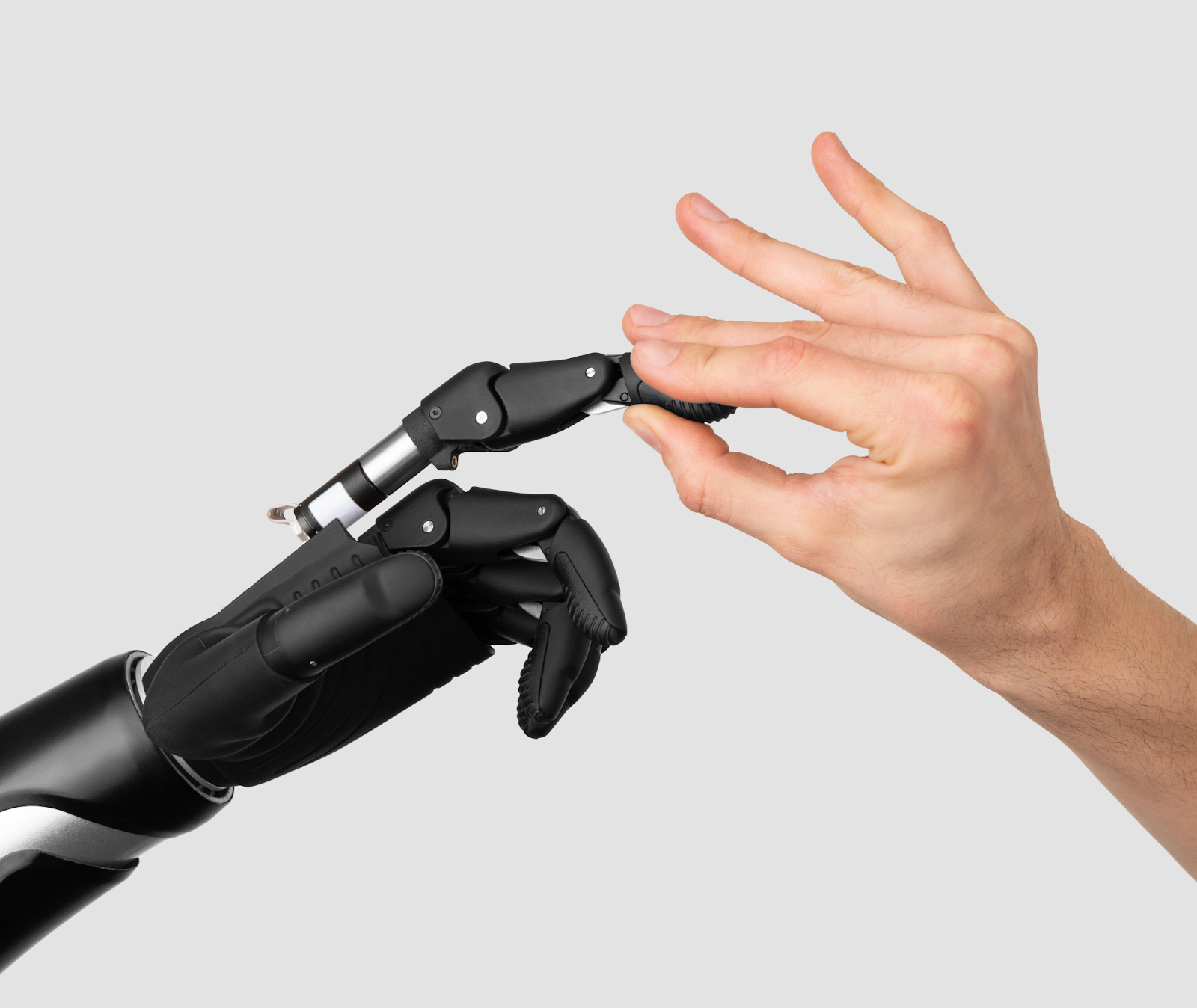
We cannot overstate the importance of working with a skilled occupational therapist (OT). These professionals are the “coaches” of the prosthetic world, helping translate mechanical movements into functional life skills.
An OT can help you develop a customized training plan that focuses on the specific gestures used in typing and texting. Many users share similar challenges and experiences when learning to type or text with a prosthesis, making professional guidance especially valuable.
One of the most valuable things an OT provides is ergonomics and fatigue management. We often don’t realize how much strain we put on our neck and shoulders when trying to see our prosthetic hand on a keyboard. A therapist can suggest monitor heights and armrest positions that keep us comfortable for hours of work.
They also help with fine motor control training, using repetitive exercises to build up the necessary “muscle” memory in the residual limb. We’ve seen that users who engage in consistent OT sessions report much higher levels of satisfaction with their prosthesis.
It turns the device from a foreign object into an integrated part of the body. Regular practice is essential to improve control and comfort when writing with a prosthetic arm.
Early prosthetic fitting and training with the device has been noted as a major factor for prosthetic acceptance. A multidisciplinary team approach is acknowledged as essential for the rehabilitation of persons with upper-limb amputation.
The emotional aspect of learning to use a prosthetic often intertwines with a sense of achievement and pride for the user. Support groups and online communities can provide valuable guidance and techniques for individuals with upper limb differences.
Essential Accessibility Features to Enable Today
Your devices already have a hidden suite of tools designed to make your life easier; you just have to turn them on. Whether you use an iPhone, an Android, or a PC, we recommend diving deep into the "Accessibility" menu. These features are often the difference between a frustrating experience and a seamless one.
On mobile devices, "One-Handed Mode" is an absolute lifesaver. It shrinks the usable area of the screen so your thumb (or prosthetic pointer) can reach all the icons without stretching. We also suggest looking into "Assistive Touch" or "Accessibility Shortcuts" that allow you to perform complex gestures with a single tap.
On computers, features like "Sticky Keys" allow you to press key combinations (like Ctrl+C) one at a time instead of all at once. This is essential if you are using your prosthesis to hold down one key while your sound hand reaches for another. These small tweaks collectively create a much more inclusive and efficient digital environment.
Overcoming Common Challenges and Frustrations
It is important to be honest: there will be days when the learning curve feels like a mountain. We all experience speed limitations and the physical fatigue that comes with learning a new way to interact with technology. The key is to acknowledge these challenges without letting them define your journey. Choosing the right writing tools can make a significant difference in overcoming these obstacles and improving your overall experience.
Sensory feedback remains one of the biggest hurdles. Because we can’t “feel” the edge of a key, we often have to look at our hands more than we used to, which can slow us down.
We suggest using tactile markers, small, clear bumps, on the “F” and “J” keys to help orient your prosthesis without needing to look down every few seconds. Prosthetic users often cite limited dexterity and lack of sensory feedback as primary reasons for abandoning the prosthesis.
Fatigue is also a real factor, as operating a prosthesis requires more mental and physical energy than a biological limb. We recommend “pacing” your digital work. Take frequent breaks to stretch your residual limb and your neck. By listening to our bodies, we can prevent the burnout that often leads to abandoning a new prosthetic technique.
Frequently Asked Questions
Can I use a stylus with my prosthetic hand?
Yes, many people prefer using a stylus for tablets and smartphones. Many modern multi-articulating hands, like the Zeus Hand, can be set in a specialized grip to hold a stylus securely, providing better precision than a prosthetic finger.
Will typing damage my prosthetic fingers?
Most high-quality prostheses are built for the rigors of daily life. However, we recommend avoiding “heavy” mechanical typing with delicate cosmetic gloves. Using a prosthesis with replaceable finger pads or durable materials ensures that your device remains in top shape even with heavy office use.
How long does it take to learn one-handed typing?
In our experience, most gain functional speed within 3 to 6 months of consistent practice. While it takes time to reach your previous “two-handed” speed, using assistive software can make you productive almost immediately.
Are there specific apps for prosthetic typing?
While there aren’t many apps specifically for prosthetic users, we highly recommend third-party keyboards like Gboard or SwiftKey. These offer superior predictive text and “swipe” capabilities that are far more user-friendly than standard stock keyboards.
What are the best ways to write with a prosthetic arm?
For writing with a prosthetic arm, adaptive grips can be added to a writing instrument like a pen or pencil to provide a larger, more comfortable surface to hold.
A universal cuff is another helpful device that attaches to the arm, wrist, or hand to securely hold a writing instrument in place. Pens or pencils with ergonomic grips are also beneficial, as they reduce pinching and contact stress.
Gel pens and fine-tip ballpoint pens are recommended because they require less pressure to write, making them easier to use for individuals with prosthetics or variations in grip strength.
Building Confidence in Your Digital Journey
As we wrap up this exploration, we want to remind you that every expert was once a beginner. Typing and texting with an upper limb prosthesis is a skill that is built over months, not days. We have seen countless individuals go from struggling with a single text to flawlessly navigating complex professional software.
At Aether Biomedical, our mission is to provide the technology that makes these transitions smoother. Whether it's through the advanced control of the Zeus Hand or our commitment to user education, we are here to support your path to independence. The digital world is yours to navigate, and we are honored to provide the tools that help you do so.
We are part of a resilient community that is constantly redefining what "ability" looks like in a digital age. Whether you are using a high-tech myoelectric hand or a simple adaptive pointer, the goal remains the same: communication without barriers. We believe that with the right approach, the keyboard isn't an obstacle; it’s an opportunity to show the world what we can do.
Ready to make your next digital milestone easier? Reach out to your clinician or contact Aether Biomedical to learn more about the Zeus Hand and the support tools available to you.
.jpg?width=352&name=a-2%20(1).jpg)
-1.png?width=352&name=unnamed%20(3)-1.png)